

archmaster
Archmaster uses AI to transform photos of any room or building into photorealistic interior and exterior designs in seconds without software or.
product Details
Explore More
Alternatives

About archmaster
Archmaster is an AI-powered interior design and architectural rendering platform that democratizes professional-grade design visualization. The tool allows users to upload a photograph of any room, exterior facade, or outdoor space, select from twenty distinct style presets, and receive a photorealistic redesign in under sixty seconds. Unlike traditional design software that requires extensive 3D modeling skills or CAD expertise, Archmaster operates entirely through an intuitive upload-and-select interface. The platform serves a broad audience including homeowners planning renovations, renters exploring non-permanent changes, real estate agents creating virtual staging presentations, interior designers generating early-stage client concepts, and architects producing quick visualizations. Core capabilities span six primary functions: interior redesign, exterior and facade transformation, sketch-to-image conversion, AI-powered render enhancement, architecture video generation, and targeted inpainting for editing specific areas of generated designs. Additionally, Archmaster provides several free utility tools including a room size calculator, paint calculator, renovation cost estimator, and color palette generator. The platform is trusted by over eight hundred designers and homeowners, offering a straightforward credit-based pricing model with no hidden fees. By removing the technical barriers and high costs traditionally associated with architectural visualization, Archmaster enables anyone to experiment with design ideas and see professional-quality results instantly.
Features
Interior AI Design
This feature allows users to upload a photo of any interior space such as living rooms, bedrooms, bathrooms, or kitchens and instantly transform it using one of twenty style presets ranging from Scandinavian minimalist to Cyberpunk drama. The AI analyzes the existing room layout, lighting, and architectural elements, then generates a photorealistic redesign that maintains realistic proportions and spatial relationships. Users can compare before and after results using an interactive slider to clearly visualize the transformation.
Exterior and Facade Design
Archmaster extends its AI capabilities to outdoor spaces, enabling users to upload photos of building exteriors, front yards, patios, or entire house facades and apply style transformations. The AI intelligently recognizes architectural features such as windows, doors, rooflines, and landscaping elements, then renders a redesigned version that respects the original structure while applying the chosen aesthetic. This feature is particularly valuable for homeowners considering curb appeal improvements or architects presenting facade renovation concepts.
Sketch to Render
This feature converts hand-drawn architectural sketches, rough floor plans, or conceptual doodles into photorealistic images within seconds. Users simply upload a photograph or scan of their sketch, and the AI interprets the lines, shapes, and spatial relationships to produce a detailed, realistic rendering complete with appropriate textures, lighting, and materials. This capability bridges the gap between initial conceptualization and professional visualization without requiring any digital drafting skills.
Edit and Modify
The Edit and Modify feature provides targeted AI inpainting capabilities that allow users to refine specific areas of any generated design. Whether changing a countertop material, replacing a light fixture, adjusting wall colors, or swapping furniture pieces, users can select a region of the image and describe the desired change. The AI then regenerates only that portion while preserving the rest of the design, enabling iterative refinement without starting from scratch.
Use Cases
Home Renovation Planning
Homeowners planning renovations can use Archmaster to visualize potential changes before committing time and money to construction. By uploading a photo of their current living room, kitchen, or bathroom and applying different style presets, they can explore various design directions such as modern, rustic, or Scandinavian. This allows for informed decision-making about paint colors, furniture styles, and overall aesthetic direction, reducing the risk of costly mistakes and ensuring the final result aligns with their vision.
Real Estate Virtual Staging
Real estate agents and property sellers can leverage Archmaster to virtually stage empty or outdated rooms, making listings more appealing to potential buyers. Instead of physically moving furniture or waiting for renovations, agents can upload photos of vacant spaces and instantly generate fully furnished, styled versions. This capability increases listing appeal, helps buyers envision the potential of a property, and can accelerate sales without the expense of traditional staging services.
Interior Designer Concept Development
Interior designers can use Archmaster as a rapid prototyping tool for generating early-stage client concepts and mood boards. Rather than spending hours creating digital renderings from scratch, designers can upload client photos, apply different style presets, and quickly produce multiple design options for client review. This accelerates the initial consultation process, facilitates faster client approvals, and allows designers to explore more creative variations than traditional methods would permit.
Architectural Client Presentations
Architects and architectural firms can utilize Archmaster to create compelling visualizations for client presentations, particularly during early design phases. The sketch-to-render feature enables architects to transform rough conceptual sketches into photorealistic images that help clients understand proposed designs. Additionally, the architecture video feature animates static renders into short walkthrough videos, providing immersive previews of building interiors and exteriors that enhance client communication and project buy-in.
Pricing
Archmaster offers a single weekly subscription plan priced at $9.99 per week. This plan provides 30 credits that auto-renew each week. One credit covers a single generation, upscale, or edit operation. Multi-view generation consumes 3 credits, and architecture video generation consumes 5 credits. Users can cancel their subscription at any time with no hidden fees. The platform also provides several free tools including a room size calculator, paint calculator, renovation cost estimator, and color palette generator that are available without any subscription.
Frequently Asked Questions
What is a credit and how does it work?
A credit is the unit of usage within Archmaster. Each generation, upscale, or edit operation consumes one credit. Multi-view generation requires three credits, and architecture video generation requires five credits. Credits are automatically renewed each week with the weekly plan, and any unused credits expire at the end of the billing cycle.
What photo formats are supported?
Archmaster supports standard image formats commonly used for photographs and digital images. Users can upload JPEG, PNG, and other common image file types. The platform is designed to work with photos taken from smartphones, digital cameras, or existing image files, making it accessible without requiring specialized equipment or file preparation.
Can it redesign building exteriors?
Yes, Archmaster includes a dedicated exterior and facade design feature that transforms building exteriors, front yards, and outdoor spaces. Users can upload photos of their home's exterior, apply any of the twenty style presets, and receive a photorealistic redesign that respects the original architectural structure while applying the chosen aesthetic transformation.
Are my uploaded photos used to train AI?
Archmaster maintains a privacy policy that addresses how user-uploaded photos are handled. Users concerned about data privacy should review the platform's privacy policy and terms of service for specific details regarding data usage, storage, and whether uploaded images are used for AI model training purposes.
Similar to archmaster

RoofReport
RoofReport lets you upload a photo of your home to instantly preview real roof shingle colors from top brands, all for free with no signup required.
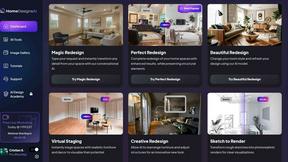
HomeDesignsAI
Transform your home and garden in under 30 seconds with HomeDesignsAI, the leading AI tool for stunning redesigns from a single photo.