

Clean Image AI-Powered Photo Cleanup
Clean Image uses AI to privately remove text, logos, and objects from photos entirely within your browser.
product Details
Explore More
Alternatives
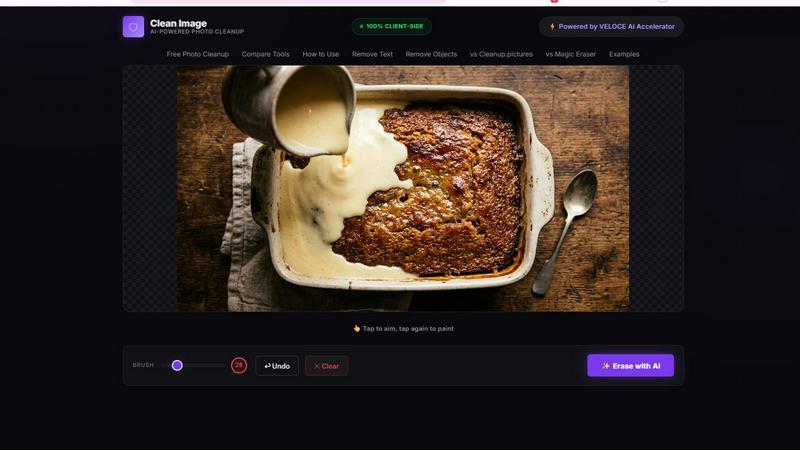
About Clean Image AI-Powered Photo Cleanup
Clean Image AI-Powered Photo Cleanup is a free, browser-based tool that leverages advanced artificial intelligence to remove unwanted elements from your photos. Whether you need to delete text overlays, logos, date stamps, watermarks, or small blemishes, this tool delivers professional-grade results without requiring any software installation or account creation. The core value proposition of Clean Image lies in its uncompromising commitment to privacy and accessibility. Unlike cloud-based alternatives that require uploading your images to external servers, Clean Image performs all processing directly within your browser using ONNX Runtime Web and WebAssembly. This means your images never leave your device, ensuring complete data security and confidentiality. The tool is powered by the OpenCV LaMa inpainting neural network, a state-of-the-art model that intelligently reconstructs removed areas by analyzing surrounding pixels. This technology is particularly effective on clean backgrounds where text, logos, or small objects need to be removed. Clean Image is designed for a wide range of users, from photographers and graphic designers to social media managers, e-commerce sellers, and everyday individuals looking to clean up personal photos. It is suitable for both personal and commercial projects, with no restrictions on usage. The interface is intuitive and straightforward: simply drop your image, brush over the elements you want to erase, and click erase. The AI model downloads once (approximately 89 MB) and caches in your browser, making subsequent visits instant and data-free. Clean Image is also powered by the VELOCE AI Accelerator, which optimizes performance for smooth and efficient processing. By combining cutting-edge AI, a privacy-first architecture, and a user-friendly interface, Clean Image offers a powerful and accessible solution for photo cleanup that puts control back in the hands of the user.
Features
100% Client-Side Privacy and Security
All image processing occurs entirely within your browser using ONNX Runtime Web and WebAssembly technology. This architecture ensures that your images never leave your device, are never uploaded to any server, and are never stored or processed by any third party. This privacy-first approach is ideal for handling sensitive or confidential images, giving you complete control over your data at all times. No accounts or subscriptions are required, further reinforcing the tool's commitment to user privacy and security.
AI-Powered Inpainting with OpenCV LaMa
Clean Image utilizes the sophisticated OpenCV LaMa inpainting neural network to intelligently reconstruct areas you brush over. The AI analyzes the surrounding pixels, textures, and patterns to generate realistic and seamless replacements for removed elements. This technology is highly effective for removing text overlays, logos, date stamps, and small blemishes, especially on clean backgrounds. The result is a natural-looking image with no visible artifacts or traces of the original unwanted content.
Instant Performance with Browser Caching
The AI model, which is approximately 89 MB in size, downloads only once during your initial visit to Clean Image. After this first download, the model is cached locally in your browser. This means that all subsequent uses of the tool load instantly with zero additional data usage. This caching mechanism ensures that you can perform multiple cleanup tasks quickly and efficiently without waiting for repeated downloads, making the tool highly responsive and convenient for frequent use.
Simple and Intuitive Brush and Erase Workflow
The user interface is designed for maximum simplicity and ease of use. You start by dropping your image or browsing for files in PNG, JPG, or WebP formats. A brush tool allows you to precisely paint over any unwanted elements, such as text, logos, or blemishes. Once you have marked the areas for removal, a single click on the Erase button triggers the AI inpainting process. The entire workflow is streamlined, requiring no technical expertise or complex settings, making it accessible to users of all skill levels.
Use Cases
Removing Watermarks and Logos from Images
Content creators, marketers, and designers often encounter images with unwanted watermarks or logos that need to be removed for professional presentations, marketing materials, or personal projects. Clean Image excels at removing these elements, particularly when they are placed on clean or uniform backgrounds. The AI inpainting model seamlessly reconstructs the background, leaving a clean, mark-free image that can be used for commercial purposes without attribution concerns.
Cleaning Up Date Stamps and Timestamps from Photos
Many digital cameras and smartphones automatically add date stamps or timestamps to photos, which can detract from the aesthetic quality of the image. Clean Image allows you to quickly and easily remove these stamps without affecting the rest of the photo. This is particularly useful for photographers who want to create timeless images for portfolios, prints, or social media, or for anyone digitizing old photos and wanting to remove distracting date overlays.
Erasing Unwanted Text Overlays and Subtitles
When repurposing screenshots, memes, or images from the web, you may encounter text overlays, subtitles, or captions that are not relevant to your intended use. Clean Image provides a simple solution for erasing these text elements. By brushing over the text and using the AI inpainting feature, the tool reconstructs the underlying image, allowing you to create clean, text-free versions of the original content for use in presentations, documents, or social media posts.
Removing Small Blemishes and Objects from Personal Photos
For personal photo editing, Clean Image can be used to remove small, distracting objects or blemishes from the background of your images. This includes items like litter in landscape photos, unwanted power lines, small shadows, or minor skin imperfections. While the tool is optimized for clean backgrounds, it can effectively handle these small cleanup tasks, helping you achieve a polished and professional look for your personal photo collection or social media uploads.
Frequently Asked Questions
Is Clean Image really free to use, and are there any hidden costs?
Yes, Clean Image is completely free to use with no hidden costs, no subscriptions, and no account creation required. There are no limits on the number of images you can process. The tool is supported by its technology partners and is designed to be accessible to everyone for both personal and commercial projects. You can use all features without any payment or registration.
How does Clean Image ensure my images remain private and secure?
Clean Image processes all images entirely within your browser using ONNX Runtime Web and WebAssembly. This means your images are never uploaded to any external server. The processing, AI analysis, and image reconstruction all happen locally on your device. No image data is ever transmitted over the internet, ensuring that your files remain completely private and secure at all times.
What types of images work best with Clean Image?
Clean Image performs best on images with clean or uniform backgrounds where you need to remove text, logos, date stamps, or small blemishes. The AI inpainting model is most effective when the area to be removed is surrounded by consistent patterns or colors. Complex backgrounds with intricate details may produce less seamless results. The tool supports PNG, JPG, and WebP image formats.
Why does the first load take longer, and what happens after that?
The first time you use Clean Image, the AI model (approximately 89 MB) must be downloaded to your browser. This initial download ensures that all processing can happen locally. After this first download, the model is cached in your browser. All subsequent visits and uses of the tool will load instantly with no additional data usage, allowing for quick and efficient photo cleanup sessions.
Similar to Clean Image AI-Powered Photo Cleanup
AIPetGen
AIPetGen turns a photo of your dog, cat, or other pet, or a written description, into a new picture or a short animation.

Chatit Me - Free Random Chat Alternative
Chat with random strangers online for free on ChatIt.me. Enjoy safe, anonymous, and instant 1-on-1 conversations with people worldwide

Presentation Intelligence
AI-native presentation and visual content platform that turns prompts, documents, images, videos, and data into polished, shareable decks.

AnimeWall
Free AI anime wallpaper generator. Create original HD anime wallpapers and avatars from text prompts.

DigiCakey
Create and send personalized digital cakes with custom frosting, fruit, candles, cards, and drawings.


PerchanceAI
PerchanceAI is an AI creative studio for image generation, editing, background removal, product photos, and image-to-video creation.

401k Calculator
401k Calculator.info is a free online tool to estimate retirement savings, employer match, and future 401(k) growth for smarter financial planning.