

KPI Studio
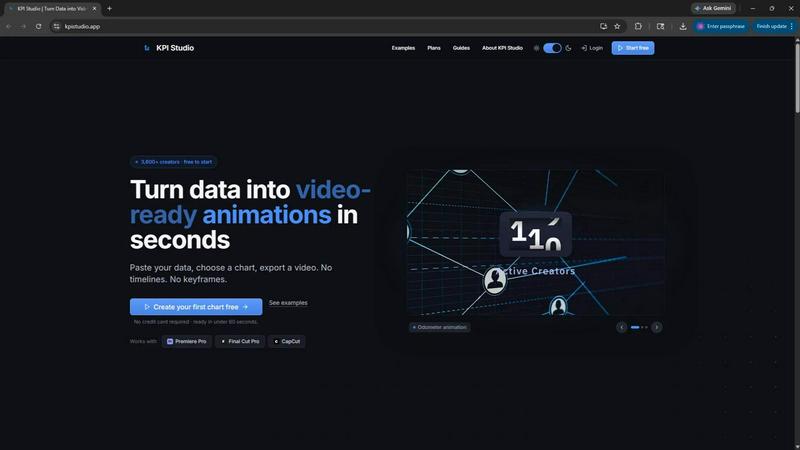
KPI Studio lets you paste raw data and export polished video charts for your editing timeline in under 60 seconds.
product Details
Explore More
Alternatives
About KPI Studio
KPI Studio is a specialized software tool designed for data-driven video creators who need to incorporate animated charts and metrics into their content without the time investment required by traditional motion design workflows. The platform addresses a fundamental problem faced by YouTubers, social media managers, business analysts, and content creators: the need to transform raw data into visually compelling, professional-grade animated visuals that integrate seamlessly into video editing timelines. Traditional methods such as taking static screenshots, using template-based design tools like Canva, or building complex animations in After Effects are either too amateurish, inflexible, or time-consuming. Hiring freelance motion designers introduces delays and costs that conflict with tight publishing schedules. KPI Studio eliminates these bottlenecks by providing a streamlined three-step process: paste your data, customize the chart type and appearance, and export a fully animated video file. The entire workflow completes in under sixty seconds, with no timelines, keyframes, or complex setup required. Exports support transparent backgrounds, allowing charts to drop directly into Premiere Pro, Final Cut Pro, or CapCut without additional editing. The platform is built for creators operating on strict publishing schedules who need reliable, repeatable results. Advanced users can leverage JSON export for deeper customization and integration into custom production pipelines. With over 3,600 creators already using the service, KPI Studio represents a practical solution for anyone who needs to present data visually in video format.
Features
Rapid Data to Video Pipeline
The core functionality of KPI Studio enables users to convert raw data into a finished animated video export in under sixty seconds. The process requires no prior motion design experience, no timeline editing, and no keyframe manipulation. Users simply paste their numerical data into the interface, select from available chart types, customize visual elements, and click export. This rapid pipeline is designed specifically for creators who face tight deadlines and cannot afford to spend hours learning complex software or waiting for freelance deliverables. The speed advantage directly addresses the broken workflow that plagues data-driven content production.
Multiple Export Formats with Transparency Support
KPI Studio offers a comprehensive range of export formats tailored to different video editing environments and distribution platforms. Users can export as MP4, MOV, GIF, or PNG sequences. Critically, the platform supports alpha channel transparency in MOV, GIF, and PNG formats, meaning the animated chart can be placed over existing video footage without a background rectangle. This feature eliminates the need for chroma keying or manual masking in editing software. Supported aspect ratios include 16:9 widescreen, 1:1 square, 9:16 vertical stories, and 4:3 standard, ensuring compatibility with YouTube, Instagram, TikTok, PowerPoint, Google Slides, and eLearning platforms.
Diverse Animated Chart Types
The platform provides a library of animated chart styles specifically designed for video contexts. Count-up number animations reveal milestone metrics such as subscriber counts, revenue totals, or progress percentages with dynamic numerical changes. Growing bar charts visually compare data points across competitors, time periods, or product lines as bars rise on screen. Drawing line charts show trends and changes over time with self-drawing line animations. These chart types are pre-configured for motion, eliminating the need for users to manually animate elements. Each chart type is optimized for clarity and visual impact in video presentations.
JSON Export for Advanced Customization
Beyond standard video and image exports, KPI Studio offers JSON export functionality for users who require deeper control over their animations. This feature allows developers and advanced creators to export the chart data and animation parameters in a structured JSON format. The exported data can then be imported into custom pipelines, integrated with other software tools, or further edited programmatically. This capability bridges the gap between the simple, no-code interface and the needs of technical users who require flexibility for complex projects, automated workflows, or integration with existing production systems.
Use Cases
YouTube Channel Analytics and Growth Reports
Content creators who produce monthly or quarterly review videos for their YouTube channels can use KPI Studio to animate key metrics such as subscriber growth, total watch time, revenue from ads, and video performance comparisons. Instead of showing static screenshots from YouTube Studio, creators can embed professional animated counters and charts that visually demonstrate their channel's trajectory. This enhances viewer engagement and makes data-driven content more compelling. The transparent background export allows these animations to be overlaid on b-roll footage or the creator's face cam, creating a polished, broadcast-quality presentation without requiring advanced After Effects skills.
Social Media Marketing Performance Videos
Social media managers and marketing teams frequently need to present campaign performance data to stakeholders or in recap videos. KPI Studio enables them to quickly generate animated charts showing metrics like engagement rates, click-through rates, follower growth, and conversion numbers. These visuals can be exported in vertical 9:16 format for Instagram Stories or TikTok, or in square 1:1 format for LinkedIn and Facebook posts. The ability to update data and re-export in seconds means marketing teams can respond to real-time campaign changes without waiting for design resources, keeping their content timely and relevant.
Business Presentation and Reporting
Professionals who create video presentations for internal meetings, client pitches, or board reports can leverage KPI Studio to animate key business metrics. Revenue growth, customer acquisition costs, market share comparisons, and quarterly performance indicators become more impactful when presented as dynamic, animated visuals rather than static slides. The export formats compatible with PowerPoint and Google Slides allow these animations to be embedded directly into slide decks, adding a layer of professionalism and visual interest that static charts cannot achieve. The speed of creation ensures that last-minute data updates do not derail presentation preparation.
E-Learning and Educational Content
Educators, trainers, and e-learning content developers can use KPI Studio to create animated data visualizations for instructional videos. Demonstrating statistical concepts, historical trends, or experimental results becomes more engaging when numbers animate on screen. For example, a teacher explaining population growth over decades can show a count-up animation reaching current figures, while a business instructor illustrating market trends can use a drawing line chart to reveal patterns gradually. The transparent background feature allows these animations to be integrated seamlessly into lecture recordings or interactive modules without distracting backgrounds.
Pricing
KPI Studio offers three pricing tiers to accommodate different usage levels. The Free plan is available at no cost and includes unlimited PNG exports, three free animated exports per month, access to all chart types, and real-time preview functionality. No credit card is required to start. The Creator Pack is a one-time purchase priced at $11.99, which includes everything in the Free plan plus ten video exports in GIF, MP4, WebM, and MOV formats, no watermark on exports, and 1080p resolution. Credits from the Creator Pack do not expire. The Pro plan is priced at $19.99 per month and is the most popular option for regular publishers. It includes everything in the Free plan with unlimited video exports in all formats, no watermark, 4K resolution exports, and the flexibility to cancel anytime.
Frequently Asked Questions
Do I need any motion design experience to use KPI Studio?
No, KPI Studio is specifically designed for users with no motion design or animation experience. The platform eliminates the need for timelines, keyframes, and complex software interfaces. The workflow consists of three simple steps: paste your data, customize the chart appearance, and export the video. The animation is generated automatically based on your data and chart selection. This makes the tool accessible to content creators, business professionals, educators, and anyone who needs to present data in video format without investing time in learning professional animation software.
What video editing software is compatible with KPI Studio exports?
KPI Studio exports are designed for seamless integration with all major video editing applications. The platform supports MP4, MOV, GIF, and PNG formats, with transparent background options available in MOV, GIF, and PNG exports. These files can be directly imported into Adobe Premiere Pro, Final Cut Pro, CapCut, DaVinci Resolve, and other NLEs without requiring any additional conversion or editing. The transparent background feature allows charts to be placed over existing footage, graphics, or backgrounds within your editing timeline, exactly as exported from KPI Studio.
Can I update the data in an existing chart without rebuilding it?
Yes, KPI Studio is built for iterative updates. If your data changes, you can simply paste the new numbers into the interface, and the chart will automatically update with the new values. The animation regenerates based on the revised data, and you can re-export the video file. This eliminates the need to reopen motion design projects, rebuild keyframes, or manually adjust animations every time a metric changes. This feature is particularly valuable for creators who produce recurring content such as weekly reports or monthly reviews where data updates are frequent.
What are the differences between the Free, Creator Pack, and Pro pricing plans?
The Free plan allows unlimited PNG exports and three free animated exports per month, with access to all chart types and real-time preview. The Creator Pack is a one-time purchase for users who need occasional exports, offering everything in Free plus ten video exports in GIF, MP4, WebM, and MOV formats, no watermark, and 1080p resolution. The Pro plan is designed for weekly publishers and includes unlimited video exports in all formats, no watermark, 4K resolution, and the ability to cancel anytime. The Pro plan is recommended for creators who publish regularly and need consistent access to high-quality animated exports.
Similar to KPI Studio
LinkedIn Translator
Turn rough notes into credible LinkedIn writing or decode professional jargon.
VideoToScript
Turn TikTok, Reels, Shorts, Facebook videos, audio, and video into accurate timestamped transcripts with TXT, SRT, and VTT exports.

Artaivo
Create AI videos, images, avatars, and audio in one creative workspace.

StopScroll
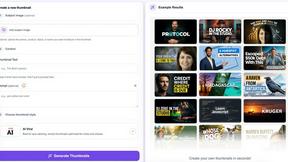
AI YouTube thumbnail maker that helps creators generate high-click thumbnails faster.



Sparqo AI
Sparqo AI is your automated marketing team that plans, writes, and distributes content across SEO and Reddit for your approval.