
Prompt Builder
Prompt Builder generates, refines, and manages AI prompts for models like ChatGPT and Gemini in one efficient workspace.
product Details
Explore More
Alternatives
About Prompt Builder
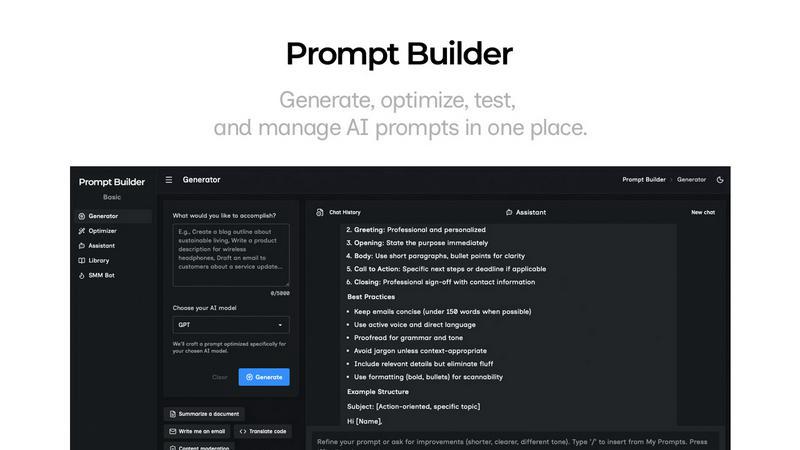
Prompt Builder is a comprehensive prompt engineering workspace designed to streamline the entire process of creating, testing, and managing AI prompts. It addresses the common pain points of prompt engineering by providing a unified platform where users can transform a simple idea into a polished, model-optimized prompt in seconds. The core value proposition is eliminating the need to manually rewrite prompts for different AI models and the inefficiency of juggling multiple tools. Users describe their task in plain English, select their target AI model, and Prompt Builder generates a tailored first draft. This draft can then be refined in a built-in chat interface, saved or pinned as different versions, and executed directly within the platform. It is built for professionals, content creators, developers, and anyone who regularly uses AI models like GPT, Claude, Gemini, Llama, and more to achieve consistent, high-quality outputs without wasting time on prompt crafting and retries.
Features
Prompt Generator
The Prompt Generator is the starting point for creating new prompts. You simply describe your task or idea in plain English and select the target AI model, such as Gemini, Claude, or GPT. The tool then generates a professional-grade, model-optimized prompt draft. This initial prompt is not generic; it is specifically tuned to the structural preferences and capabilities of the chosen model, providing a solid foundation that you can immediately refine further in the integrated chat workspace.
Prompt Assistant
The Prompt Assistant is a built-in chat workspace that allows you to test and iterate on your prompts without ever leaving Prompt Builder. You can run your generated or optimized prompts directly within the Assistant, select from various AI models (like Grok, DeepSeek, or Gemini) for testing, and have a conversational back-and-forth to refine the output. All chat history is saved, enabling fast iterations and preventing you from losing successful prompt versions across disparate chat threads.
Prompt Optimizer
This feature is designed to upgrade existing prompts. You can paste any prompt you already have or select one from your personal Library. The Optimizer then analyzes and improves it, offering structured enhancements for clarity, adding necessary constraints, defining output formats, and suggesting examples. Each optimization is saved in a history log, and you can pin your favorite versions. With one click, you can send the optimized prompt to the Assistant for immediate testing.
Prompt Library
The Prompt Library serves as your central repository for organizing and reusing prompts. It consists of two parts: "My Prompts" for your saved and pinned creations, and "Community Prompts" where you can explore templates shared by other users. You can search, filter by category and model, and edit your prompts. Any saved prompt can be instantly run in the Assistant as a new chat, making it easy to build a reusable asset library for yourself or your team.
Use Cases
Content Creation and Marketing
Marketing professionals and content creators can use Prompt Builder to rapidly generate and refine prompts for blog outlines, social media posts, ad copy, and email campaigns. The SMM Bot feature specifically helps turn a brief into platform-ready posts for X, LinkedIn, and Instagram, complete with tone adjustments and calls-to-action. This streamlines the content pipeline from idea to polished draft.
Software Development and Technical Tasks
Developers and engineers can leverage the tool to create precise prompts for code generation, debugging, documentation, and system design explanations. By optimizing prompts for specific coding models or using the Optimizer to add strict constraints and output formats, they can get more reliable, executable code snippets and technical explanations, reducing time spent on debugging AI outputs.
Research and Analysis
Researchers, analysts, and students can utilize Prompt Builder to craft detailed prompts for summarizing complex papers, comparing concepts, generating literature reviews, or analyzing data sets. The ability to save successful prompt templates in the Library ensures that rigorous analytical methods can be reused and refined across different projects, maintaining consistency and quality in research outputs.
Business Operations and Productivity
Business professionals across functions like HR, sales, and operations can generate prompts for drafting reports, creating meeting agendas, writing job descriptions, or preparing sales outreach. The model-specific tuning ensures that prompts for formal business documents (suited for Claude) differ from those for creative outreach (suited for GPT), helping teams get the right tone and structure on the first attempt.
Frequently Asked Questions
What AI models does Prompt Builder support?
Prompt Builder is designed to work with a wide array of leading and emerging AI models. This includes popular models like OpenAI's GPT, Anthropic's Claude, Google's Gemini, Meta's Llama, Mistral AI's models, DeepSeek, xAI's Grok, Perplexity, and Cohere. The Prompt Generator tailors your prompt's structure and constraints specifically for the model you select to improve response quality.
How does the free plan work?
The free plan offers users a generous starting point with 25 assistant requests per month at no cost and without requiring a credit card. This allows you to fully experience the core workflow: generating model-tuned prompts, refining them in the chat-based Assistant, and saving them to your Library. It's an excellent way to test the platform's capabilities with your existing AI tools.
Can I use Prompt Builder with my existing API keys?
The provided context describes Prompt Builder as a standalone workspace with its own built-in Assistant for running prompts. It mentions running prompts "inside Prompt Builder" with model selection for Grok, Gemini, GPT, and others. This suggests the platform provides integrated access to these models, so you typically would not need to bring your own API keys to use the core testing and generation features within the ecosystem.
How does the Prompt Optimizer improve my prompts?
The Prompt Optimizer provides structured improvements to any prompt you provide. It focuses on key areas such as enhancing overall clarity and instruction specificity, adding or refining constraints to narrow the AI's focus, defining a precise output format (like JSON, a list, or a report), and suggesting relevant examples to include in the prompt. This systematic approach transforms vague or ineffective prompts into clear, actionable instructions for the AI.