

QUVIAI
QUVIAI is an AI-powered platform that generates photo visuals, 3D scenes, videos, and music from text or image inputs.
product Details
Explore More
Alternatives
About QUVIAI
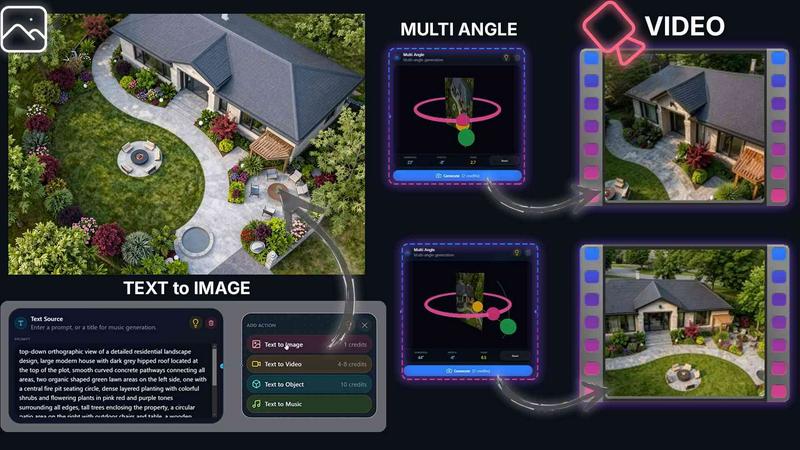
QUVIAI is an all-in-one AI-powered creative platform specifically designed for architects, designers, and creators who need to move from concept to polished visual output without switching between multiple software tools. The platform allows users to upload a sketch, image, or 3D model and transform it into photorealistic renders, cinematic videos, multi-angle views, floor plan renders, 3D objects, and even original music all within a single workspace. At its core, QUVIAI eliminates the traditional friction of architectural visualization by combining powerful AI generation with a built-in 3D workspace that supports modeling, rendering, and iterative editing. Users can edit scenes using simple text prompts, generate furniture and decorative objects, stage them precisely within a scene, and produce cinematic walkthroughs from start and end frames. The platform is accessible across web, iOS, and Android devices, making it suitable for both studio work and on-the-go ideation. QUVIAI is built for professionals who demand speed and quality, but its intuitive interface also welcomes beginners exploring architectural design. The main value proposition is consolidation: instead of juggling separate tools for rendering, video creation, 3D modeling, and music production, QUVIAI provides a unified environment where every stage of the creative workflow can happen seamlessly. The platform offers free credits for new users to test its capabilities, with a focus on production-ready outputs that range from concept visuals to polished architectural renders and edits.
Features
AI Image Generation
This feature enables users to turn any text prompt or reference image into stunning photorealistic architectural renders in seconds. The image generation suite supports both text-to-image and image-to-image workflows, allowing architects to quickly visualize concepts, experiment with materials, and iterate on designs without manual rendering. The AI understands architectural language, producing accurate lighting, textures, and spatial compositions that match professional standards.
AI Video Creation
QUVIAI transforms static visuals into dynamic video content, including animated walkthroughs, cinematic sequences, and scene transitions. Users can animate still renders, generate walkthroughs from a single prompt, or create complete cinematic sequences by defining start and end frames. This feature is essential for presentations and client pitches where movement through a space conveys scale and atmosphere more effectively than static images.
Multi Angle Camera
This tool generates multiple architectural viewpoints from a single source image, producing a rich set of presentation-ready perspectives. Architects can quickly produce front, side, top, and interior views without re-rendering each angle manually. The multi-angle suite ensures consistency across all views, making it ideal for design reviews, marketing materials, and portfolio presentations that require comprehensive visual documentation of a project.
Object Staging
Object staging allows users to generate 3D objects, such as furniture and decorative elements, and place them into scene backgrounds with consistent lighting and perspective. The staging suite handles object placement, scale adjustments, and lighting integration automatically, producing polished compositions that look natural and professionally composed. This feature is particularly useful for interior design visualization and product placement in architectural scenes.
Use Cases
Architectural Concept Visualization
Architects can take a rough hand sketch or early concept drawing and use QUVIAI to generate photorealistic renders in seconds. This accelerates the initial design phase, allowing multiple design iterations to be explored visually before committing to detailed modeling. The text-to-image capability lets architects describe material changes, lighting conditions, or spatial adjustments, instantly seeing how those changes affect the overall design without manual rework.
Client Presentation and Marketing
For real estate developers and architecture firms, QUVIAI enables the creation of cinematic walkthrough videos and multi-angle views from a single source model. These polished outputs can be used in client presentations, marketing brochures, and online listings to showcase properties in their best light. The ability to generate consistent, high-quality visuals across multiple angles saves significant production time and ensures a professional presentation every time.
Interior Design and Furniture Staging
Interior designers can use the object staging feature to populate empty room renders with generated furniture, decor, and fixtures. By staging objects directly into scene backgrounds, designers can test different layouts, color schemes, and furniture styles without physical samples or complex 3D modeling. The consistent lighting and perspective ensure that the final composition looks realistic and ready for client approval.
Rapid Design Iteration and Exploration
Design teams working on competitions or tight deadlines can use QUVIAI to rapidly explore multiple design directions. By combining image generation, video creation, and editing tools, teams can produce a wide range of visual outputs from a single base model. The platform's editing suite allows for quick refinements, masking, and cleanup, making it possible to iterate on designs in hours rather than days.
Pricing
QUVIAI offers a free tier with initial credits for new users to explore the platform. For detailed pricing information on paid plans, tiers, and subscription costs, users should visit the official QUVIAI website at quvi.ai or contact the sales team directly. The platform provides scalable options suitable for individual creators, small studios, and large architectural firms.
Frequently Asked Questions
What types of input files does QUVIAI support?
QUVIAI accepts a variety of input formats including sketches, images, and 3D models. Users can upload hand-drawn sketches, digital images, or existing 3D scene files to begin the generation process. The platform is designed to work with common architectural file types and image formats, making it compatible with most design workflows.
Can I use QUVIAI on mobile devices?
Yes, QUVIAI is available on web, iOS, and Android platforms. This cross-platform availability allows users to start projects on their desktop and continue editing or generating on mobile devices while on site visits or traveling. The mobile apps are optimized for touch interaction and provide core functionality for image and video generation.
How does the AI handle architectural accuracy and scale?
QUVIAI's AI is specifically trained on architectural data to understand spatial relationships, scale, materials, and lighting. When generating renders from sketches or models, the AI preserves the structural integrity of the design while enhancing visual quality. Users can further refine outputs using text prompts to adjust proportions, materials, and environmental conditions.
Is there a free trial available?
Yes, QUVIAI offers free credits for new users to explore the platform's capabilities. Users can sign up at quvi.ai and begin generating renders, videos, and other outputs immediately without any upfront payment. The free credits allow users to test all core features before committing to a paid plan.
Similar to QUVIAI
Artaivo
Create AI videos, images, avatars, and audio in one creative workspace.
Vismuse
Create polished AI images and videos from prompts or references for social posts, ads, flyers, album covers, and campaigns.
UGCad AI
AI UGC video ad Generator which Turn a URL, prompt, or template into a ready video ads

PerchanceAI
PerchanceAI is an AI creative studio for image generation, editing, background removal, product photos, and image-to-video creation.

401k Calculator
401k Calculator.info is a free online tool to estimate retirement savings, employer match, and future 401(k) growth for smarter financial planning.

StopScroll
AI YouTube thumbnail maker that helps creators generate high-click thumbnails faster.

HubVanta AI
HubVanta AI helps creators generate images and videos with advanced AI tools for visual content workflows.
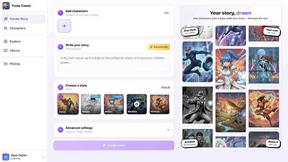
Yume Comic
Yume Comic uses AI to transform your text prompts into consistent manga, manhwa, or webtoon pages without drawing skills.