

retroshelf
Retroshelf automatically logs your retro handheld gaming sessions and connects you with a community to discover trends and share your play history.
product Details
Explore More
Alternatives
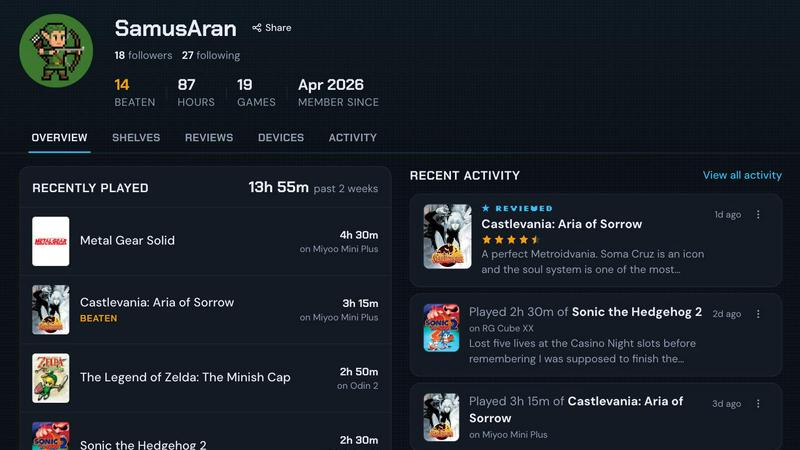
About retroshelf
retroshelf is a specialized play-tracking and discovery application built exclusively for the retro handheld gaming community. It solves a fundamental problem for enthusiasts who own multiple devices like the Miyoo Mini, Anbernic RG series, or Odin handhelds: keeping a coherent, accessible record of what they have played, where they played it, and for how long. Instead of relying on fragmented notes, spreadsheets, or memory, users get a unified platform that automatically logs every gaming session. A lightweight plugin installed on the device's SD card captures key metadata including the game title, session duration, and the specific handheld used. This data is then synced to the user's public shelf, which displays their current games, completed titles, reviews, and replays in a device-aware context. The platform also functions as a social discovery hub, allowing users to browse what others are playing, filter by popular devices, and see real-time trends in the retro gaming community. retroshelf is currently in a closed beta phase, targeting passionate retro handheld players who want to help shape the community from its earliest stages. The core value proposition is simple: every game you play is worth remembering, and retroshelf makes that remembering effortless, automatic, and socially engaging.
Features
Automatic Session Logging
A tiny, lightweight plugin runs silently on your retro handheld device and captures every gaming session automatically. It records the game title, the exact minutes played, and the specific handheld model you are using. This eliminates the need for manual note-taking or spreadsheets, ensuring your play history is always up to date without any extra effort on your part.
Public Shelf with Device Context
Your personal shelf is a public profile that showcases your gaming activity with full device context. Visitors can see not just what you are playing, but which handheld you used for each session. This contextual information transforms a simple list of games into a meaningful log that reflects your hardware preferences and gaming habits across multiple devices.
Browsable Timeline of Play History
retroshelf organizes your scattered sessions across different handhelds into a coherent, browsable timeline. You can look back at any period and see exactly what you played, on which device, and for how long. This feature turns your year of play into a legible record that you can revisit, analyze, and share with the community.
Community Discovery and Trending Games
The platform surfaces real-time trends in the retro handheld community, showing which games are being picked up, finished, and replayed most frequently. You can browse by specific device models, such as Miyoo or Anbernic, to see what other players are enjoying on the same hardware. This makes game discovery contextual and relevant to your own collection.
Reviews with Handheld Context
Star ratings and written reviews on retroshelf are always accompanied by the specific handheld on which the game was played. This provides far more useful feedback than a generic number, because a game that runs well on a high-end Odin might perform differently on a budget Miyoo Mini. Reviews become actionable insights tied to real hardware configurations.
Use Cases
Tracking a Growing Handheld Collection
A collector who owns five different retro handhelds can use retroshelf to log sessions across all devices without confusion. The automatic plugin on each device ensures that playtime is attributed correctly, and the public shelf provides a single dashboard to see which handhelds are getting the most use and which games are being played on each one.
Discovering Games Based on Hardware
A user who just purchased an Anbernic RG35XX can browse the community shelves filtered by that specific device. They can see which games other Anbernic owners are playing, finishing, and replaying, making it easy to find titles that are known to work well and are popular on that exact hardware platform.
Reflecting on Personal Gaming Habits
A player who wants to understand their own gaming patterns over the course of a year can use the browsable timeline feature. They can review which months were most active, which devices they favored during different periods, and which genres or franchises they spent the most time on, turning raw play data into personal insights.
Sharing and Comparing with Friends
A group of friends who all own retro handhelds can follow each other's public shelves. They can see what games their friends are currently playing, compare completion rates, and discover new titles through trusted recommendations. The device context adds a layer of useful information, such as knowing which handheld a friend used for a particularly enjoyable playthrough.
Frequently Asked Questions
How does the automatic session logging work?
The logging process is straightforward and requires minimal setup. You download a tiny plugin file and drop it onto the SD card of your retro handheld device. After linking the device to your retroshelf account, the plugin runs in the background during gameplay. It captures the game title, session duration, and device information, then syncs this data to your shelf automatically. There is no need to manually start or stop recording.
Which operating systems are currently supported?
retroshelf currently supports muOS and OnionOS, two of the most popular custom firmware options for retro handheld devices. These operating systems are commonly found on devices like the Miyoo Mini Plus and various Anbernic models. Support for additional operating systems may be added as the platform develops during its closed beta phase.
Is my shelf public by default? Can I control privacy?
Yes, your shelf is designed to be public as part of the community discovery features. The platform is built around the idea of sharing what you play so that others can find new games and see trends. Currently, retroshelf does not offer private or hidden shelf options, as the social discovery aspect is a core feature. You should consider this before joining the beta if you prefer complete privacy.
How can I join the closed beta?
retroshelf is currently in a closed beta phase and is opening access in small waves. You can join the waitlist by visiting the retroshelf website and clicking the "Join beta" button. The team is prioritizing retro handheld players who are enthusiastic about shaping the community from the beginning. If you are already part of the beta, you can sign in directly from the homepage.
Similar to retroshelf
Country comparison
Compare up to 4 destinations on scores, costs and best months.

PrettyScale
PrettyScale offers free, private AI face analysis tools including beauty scoring, celebrity look-alikes, and shape detection that run entirely in.

Burge Coffee
Burge Coffee is a free, account-free platform offering home roasting guides, batch tracking tools, and a map of the world's best small roasters for.
On Music AI
On Music AI transforms text, lyrics, or ideas into complete songs with vocals, beats, and instrumentals in minutes.

Bloom Plant ID
Bloom Plant ID instantly identifies any plant, diagnoses diseases, and sends personalized care reminders to help your garden thrive.
HavenBook
HavenBook simplifies home maintenance with personalized tasks and reminders, helping you protect your investment and avoid costly repairs.
NinjaHackz
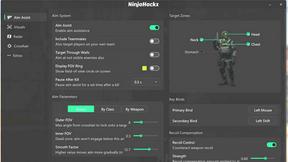
NinjaHackz is a portable CS2 cheat that provides aimbot, wallhack, and ESPs for effortless gameplay without installation.
True Moments
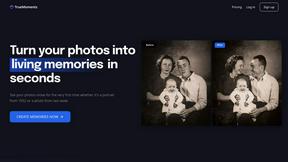
True Moments animates your photos with subtle AI motion in under 60 seconds, keeping your memories private.