

Very Good Calendar Sync
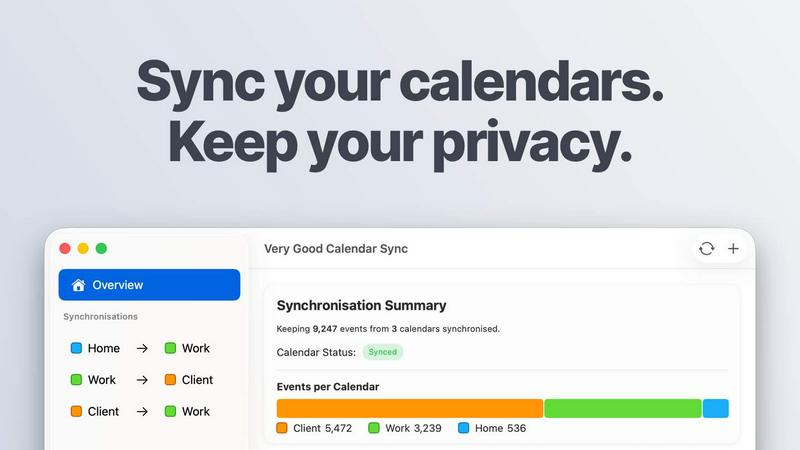
Very Good Calendar Sync quietly keeps your work, personal, and client calendars aligned on your Mac without linking accounts or exposing sensitive.
product Details
Explore More
Alternatives
About Very Good Calendar Sync
Very Good Calendar Sync is a macOS application designed to eliminate the chaos of managing multiple calendars across different platforms. It runs directly on your Mac, synchronizing events between any calendars available in macOS Calendar.app, including Google Calendar, Microsoft Outlook, Apple iCloud, and any CalDAV account. The core value proposition is simple: keep your calendars perfectly aligned without ever sharing your credentials or exposing sensitive data to third parties. The app operates entirely on your device, with no cloud storage, no analytics, and no external servers. This makes it an ideal solution for consultants managing client calendars, employees balancing work and personal schedules, freelancers juggling multiple projects, and anyone tired of double-bookings and manual cross-checking. Setup takes approximately two minutes, after which the app runs quietly in your menu bar, automatically synchronizing changes in the background. You maintain complete control over what gets synchronized, including which weekdays, time ranges, and event details to share. The first sync between two calendars is free, with affordable monthly, annual, and lifetime plans available for users who need more.
Features
Clone or Redact Event Details
Share your availability without sharing your personal life. When synchronizing events, you can choose to clone them with full details, including title, description, and location, or redact them to show only that you are busy. This feature ensures that sensitive information from one calendar remains private while still providing accurate availability to others. For example, a personal doctor appointment can appear on your work calendar simply as "Busy," protecting your privacy while preventing scheduling conflicts.
Stays Out of the Way
The application runs quietly in your macOS menu bar and requires no ongoing interaction after initial setup. Once you configure your synchronization preferences, the app monitors your calendars continuously and applies changes automatically whenever events are added, modified, or deleted. This hands-off approach means you can focus on your work without constantly checking whether your calendars are up to date. The app synchronizes in the background, so you never have to remember to manually update multiple calendars.
No Accounts to Link
Your Google, Microsoft, and Apple credentials remain securely stored within macOS Internet Accounts, the native system for managing account access on your Mac. There are no logins on third-party websites, no sharing of passwords, and no additional accounts to create. The app simply uses the calendar access your Mac already has configured. This architecture eliminates the security risks associated with granting third-party services access to your calendar data, as no external service ever handles your credentials or event information.
Filter by Day and Time
Each synchronization you create can have its own custom rules for which events are included. You can choose to synchronize only weekdays, only weekends, or pick specific days of the week. Additionally, you can set a daily time range, such as 9 AM to 6 PM, to limit syncing to work hours only. A start date for synchronization can also be configured. These granular controls ensure that only the relevant events from your source calendar are shared with your target calendar, preventing personal evenings and weekends from appearing on your work schedule.
Use Cases
Consultants Managing Multiple Client Calendars
Consultants often work with several clients, each maintaining their own calendar system. Without synchronization, consultants risk double-booking or missing appointments because they cannot see all their commitments in one place. Very Good Calendar Sync allows consultants to keep every client calendar aligned with their primary schedule, automatically updating availability across all platforms. The redact feature is particularly valuable here, as consultants can show clients only their busy times without revealing details about other clients or personal events.
Employees Balancing Work and Personal Schedules
Professionals with separate work and personal calendars frequently face the challenge of ensuring their team can see when they are unavailable without exposing personal information. By synchronizing a personal calendar to a work calendar with redacted event details, employees can automatically show their colleagues when they are busy with personal appointments, such as dentist visits or family events. This prevents scheduling conflicts during team meetings while maintaining privacy. The filter options allow employees to exclude weekends and evenings from synchronization, keeping personal time truly personal.
Freelancers Juggling Multiple Projects
Freelancers often manage calendars for different projects or clients, each with its own scheduling demands. Manually cross-checking these calendars is time-consuming and error-prone. Very Good Calendar Sync automates this process, ensuring that a meeting booked for one project automatically blocks that time on all other calendars. The ability to set different synchronization rules for each calendar pair allows freelancers to customize how much detail each client sees, from full event information to simple busy indicators.
Agencies and Cross-Functional Teams
Agencies that manage both internal team calendars and client-facing calendars benefit from real-time synchronization across all parties. When a team member books an internal meeting, that time block automatically appears on client calendars as unavailable, preventing scheduling conflicts. Similarly, client meetings update internal calendars instantly. This eliminates the confusion and double-booking that often occurs when teams rely on manual updates or separate calendar systems. The app ensures everyone sees the same, accurate availability at all times.
Pricing
Very Good Calendar Sync offers a free tier and three paid plans. The first synchronization between two calendars is completely free with no payment required. For users who need more, the following plans are available: Monthly at 1.99 pounds per month with flexible month-to-month billing and cancellation anytime. Annual at 19.99 pounds per year, which saves over 15 percent compared to monthly billing. Lifetime at 39.99 pounds as a one-time payment, which includes all future updates. All paid plans include unlimited synchronizations, all calendar providers, and email support. Each license is per user for all of your Macs. You can download the app for free and choose your plan within the application.
Frequently Asked Questions
Do you store any of my calendar data?
No. Very Good Calendar Sync runs entirely on your Mac and does not store, transmit, or process any of your calendar data on external servers. The app has no servers of its own, no data collection mechanisms, and no analytics tracking. Your calendar data never leaves your device. The app uses your Mac's native calendar access to read and write events directly to your calendars through macOS. Nothing is transmitted externally, and no third party ever has access to your event details, credentials, or scheduling patterns.
Which calendar providers are supported?
Any calendar that appears in macOS Calendar.app is supported. This includes Google Calendar, Microsoft Outlook and Exchange, Apple iCloud, and any CalDAV account you have configured. There is no extra setup required beyond what you have already done to add these accounts to your Mac. The app works directly with the calendars you already use, so there are no new connections to configure and no additional apps to install. If your calendar shows up in Calendar.app, it works with Very Good Calendar Sync.
Does it sync when my Mac is off or asleep?
No. Because the app runs entirely on your Mac, it can only synchronize calendars when your Mac is powered on and awake. When your Mac is turned off or in sleep mode, the app cannot monitor or update your calendars. Synchronization will resume automatically when your Mac wakes up, applying any changes that occurred while it was offline. This is a necessary limitation of on-device synchronization, which prioritizes your privacy and data security over continuous cloud-based operation.
Is this app available for Windows or iOS?
Very Good Calendar Sync is currently available only for macOS. There are no versions for Windows or iOS at this time. The app is built specifically to integrate with macOS Calendar.app and the operating system's native calendar access features. This tight integration is what allows the app to operate without requiring third-party access to your accounts or storing your data externally. Future platform availability has not been announced.
Similar to Very Good Calendar Sync
Interview Screener- Ai hiring Software
AI hiring platform to screen resumes, run 10-language voice interviews, and rank top talent automatically.
Product Launch Checklist
A free launch checklist for SaaS, apps, AI tools and more. Every step says why it matters and when you can skip it.
Kody Tools
Free collection of online developer utilities, code formatters, and digital converters designed to streamline your daily workflow.


iHatePosting
Create once, tailor for each platform, and schedule posts across 14 social networks from one simple dashboard.
PDFWix
PDFWix is a free online PDF toolkit designed to make everyday PDF tasks simple, fast, and private.
PDFKing
Free online PDF tools to merge, compress, convert, edit, sign, and manage documents—no signup, watermarks, or daily limits.
