

xyOps
xyOps is a next-generation workflow automation system that unifies job scheduling, monitoring, alerting, and ticketing for your entire infrastructure.
product Details
Explore More
Alternatives
About xyOps
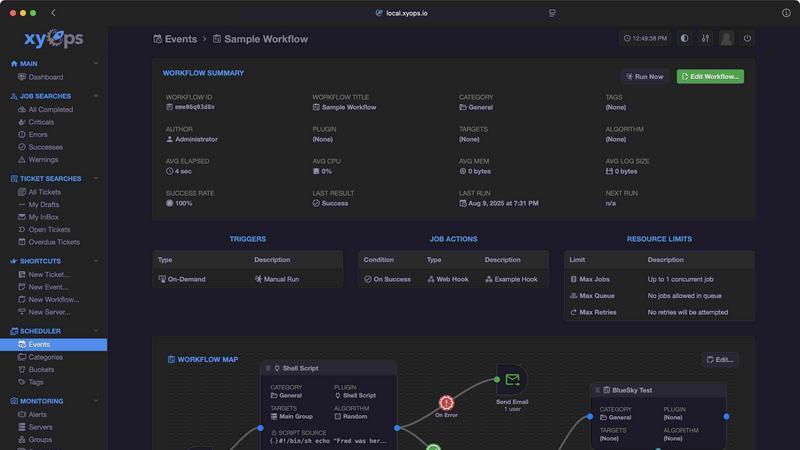
xyOps is a next-generation, open-source platform that consolidates job scheduling, workflow automation, server monitoring, alerting, and incident response into a single, cohesive system. Designed for developers and operations teams, xyOps provides complete control over automation infrastructure without hidden paywalls, data collection, or telemetry. It runs anywhere and is built to be extensible, transparent, and adaptable to environments of any scale. The platform allows users to schedule jobs across entire server fleets, track performance in real time, set up complex alerts, and manage incidents with an integrated ticketing system. Unlike traditional tools that require piecing together multiple standalone solutions, xyOps offers an all-in-one approach that simplifies operations. Its visual workflow builder enables users to chain jobs with conditional logic, pass data between steps, and attach limiters like timeouts and memory caps. The job scheduler supports targeting individual servers or groups, multiple schedules per event, blackout ranges, and one-time jobs. Server monitoring includes CPU, memory, network, disk, and custom metrics, all displayed on historical performance graphs. Smart alerts use trigger expressions with flexible rules and can automatically create tickets or run jobs. The platform scales from five servers to thousands, supports hot backups for redundancy, and installs agents on macOS, Linux, and Windows. xyOps is licensed under the BSD 3-Clause license, ensuring it remains free and open source forever, with all features available without restriction.
Features
Visual Workflow Builder
The graphical workflow editor allows users to connect events, triggers, actions, and monitors into meaningful pipelines without writing complex code. You can chain multiple jobs with conditional logic, pass data and files between workflow steps, assign actions to events such as notifications or webhooks, and attach limiters like timeouts, memory caps, and log size caps. Workflows can run jobs in parallel or use custom queues for sequential processing.
Flexible Job Scheduler
xyOps provides a powerful job scheduling system that goes far beyond traditional cron. You can target individual servers or entire groups, set multiple schedules per event, define blackout ranges for holidays or downtime, and import existing crontab configurations. The scheduler also supports one-time jobs and plugin-based extensions, giving you complete flexibility over when and how jobs execute across your infrastructure.
Active Job Tracking
Run any number of jobs in parallel with optional maximum parallel limits and automatic queuing. The platform provides real-time progress updates along with time remaining estimates. You can enforce CPU and memory usage limits per job, while your jobs can emit their own progress and stats. Additionally, you can run custom actions based on job results, enabling dynamic responses to success or failure conditions.
Smart Alerts and Integrated Ticketing
Rich alerting capabilities include trigger expressions with flexible rules, email and webhook notifications, and custom notification channels. Every alert includes a snapshot of the affected server for immediate context. Alerts can automatically create tickets or trigger job executions to remediate issues. Active alerts can also prevent new jobs from launching, providing safety mechanisms. The built-in ticketing system supports incident response with file attachments, job execution for CI/CD, and full API scripting.
Use Cases
Centralized Infrastructure Orchestration
Operations teams managing fleets of servers can use xyOps to schedule maintenance tasks, deploy updates, and run health checks across thousands of machines from a single interface. The platform's group targeting and real-time tracking ensure that jobs execute correctly, while alerts notify teams immediately if any server fails to respond or produces unexpected results.
Automated Incident Response Workflows
When a critical alert triggers, xyOps can automatically create a support ticket, execute a diagnostic job on the affected server, and notify the on-call engineer via email or webhook. The workflow builder allows teams to chain multiple remediation steps, such as restarting services, rolling back deployments, or scaling resources, all without human intervention until escalation is required.
Continuous Integration and Deployment Pipelines
Development teams can use xyOps to build CI/CD pipelines that compile code, run tests, and deploy applications across staging and production environments. The platform's job scheduler ensures builds run at specified times or on demand, while the ticketing system can track deployment history and rollback requests. Plugin integrations with GitHub and other tools streamline the entire software delivery process.
Custom Monitoring and Data Collection
Teams with specialized monitoring needs can create custom monitors that run commands to gather unique metrics, such as application-specific performance data or custom log patterns. These metrics are displayed on historical graphs and can trigger alerts when thresholds are breached. The plugin API allows writing monitors in any language, making it easy to integrate with existing monitoring tools and scripts.
Frequently Asked Questions
What is the licensing model for xyOps?
xyOps is 100% free and open source under the BSD 3-Clause license. This license will never be modified, split, or amended with additional restrictive terms. No new code or contributions will ever be accepted under a non-OSI-approved license. All current and future app features will remain open source forever, with professional and enterprise support plans available separately.
Can xyOps scale to handle thousands of servers?
Yes, xyOps is built for fleets of any size, from five servers to five thousand or more. It supports running multiple hot backups that can take over on power loss without interrupting jobs. Worker servers can be grouped manually or automatically based on hostname, and agents can be easily installed on macOS, Linux, and Windows operating systems.
How does the plugin system work?
xyOps uses a simple JSON over STDIO Plugin API that requires no SDK, and all programming languages are supported. Plugins can define custom parameters with UI form fields and come in multiple types including Event, Action, Monitor, and Trigger. The Plugin Marketplace offers a growing library of ready-made plugins, including integrations with Atlassian, AWS S3, Discord, GitHub, Google Sheets, Notion, OpenAI, Slack, Telegram, and more.
What kind of alerting capabilities does xyOps provide?
xyOps offers smart alerting with trigger expressions that support flexible rules. Notifications can be sent via email, webhook, or custom channels. Each alert includes a snapshot of the affected server for immediate context. Alerts can automatically create tickets or run jobs to remediate issues. Active alerts can also prevent new jobs from launching, providing a safety mechanism to avoid cascading failures.
Similar to xyOps

iHatePosting
Create once, tailor for each platform, and schedule posts across 14 social networks from one simple dashboard.

Wisegrid
Wisegrid helps project-driven teams manage projects, workflows, resources, and reporting in a familiar spreadsheet-style workspace.

Postqued
Schedule and publish social content across 10 platforms with one dashboard, API, and MCP built for teams and AI agents.

Groniz
Run your social media on autopilot with AI agents. Post & schedule to 32+ networks from Claude Code, Codex, or Console.

EchoLeads AI
EchoLeads AI uses intelligent voice agents to automate cold calling, lead qualification, and appointment scheduling across multiple channels.
Distro
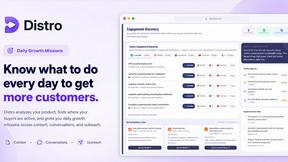
Distro finds live buyer conversations, drafts replies in your voice, and turns questions into SEO content you approve.
Minded
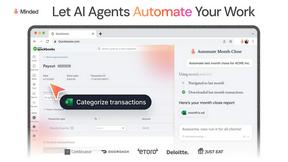
Minded lets you record screen actions once to train AI agents that autonomously operate your software tools and clear tasks from your plate.

YCaaS
YCaaS deploys AI agents to handle every business role end-to-end, eliminating operational gaps.