

BlueHumanizer
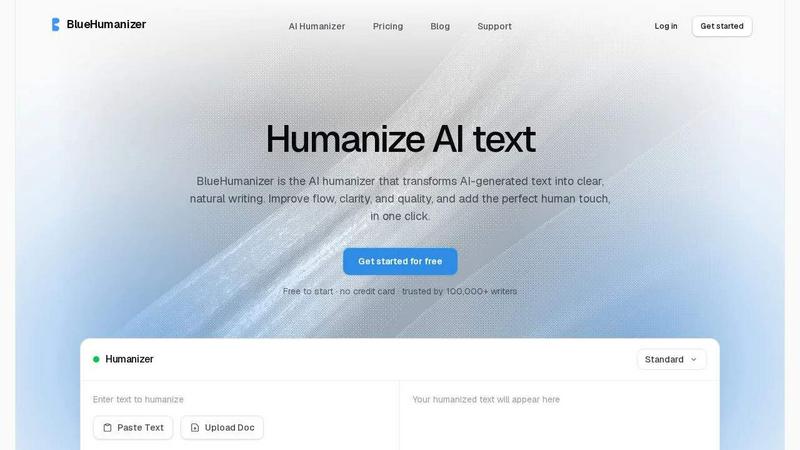
BlueHumanizer instantly transforms stiff AI text into clear, natural writing that retains your meaning and tone.
product Details
Explore More
Alternatives
About BlueHumanizer
BlueHumanizer is an AI humanization tool designed to transform AI-generated text into clear, natural, and polished writing with a single click. It works with output from all major AI writing tools, including ChatGPT, Claude, Gemini, and others, rewriting them into human-sounding prose that features better flow, sharper phrasing, and improved readability. Unlike basic synonym-swapping tools, BlueHumanizer reshapes sentence structure and restores the natural rhythm that makes writing feel authentic and engaging. The tool is built for a diverse audience, including students refining essays, researchers polishing academic papers, marketers producing on-brand copy, non-native English speakers seeking fluent output, and bloggers or creators maintaining consistent content quality. Its core value proposition lies in preserving the original meaning, tone, and key points while enhancing clarity and naturalness, all without altering quotes, citations, or references. With support for over 50 languages, adjustable humanization levels, and tone controls, BlueHumanizer offers flexibility for various writing contexts. It is free to start, requires no credit card, and is trusted by over 100,000 writers worldwide, making it a reliable solution for anyone who writes with AI and needs output that reads clean, natural, and ready for publication.
Features
One-Click Humanization
BlueHumanizer simplifies the entire rewriting process into a single action. Users can copy text from any AI tool, paste it into the interface, and click a button to receive polished, human-sounding output. There is no setup, no learning curve, and no need for manual editing. This feature is designed for efficiency, allowing writers to transform rough AI drafts into clear, flowing prose in seconds, making it ideal for fast-paced workflows where time is critical.
Preserves Meaning, Tone, and Citations
The tool ensures that the core intent, tone, and key points of the original text remain intact after humanization. It does not alter the message or introduce unintended changes. Additionally, quotes, citations, and references are left completely untouched, with only the surrounding writing being refined. This is particularly valuable for academic and professional users who need to maintain accuracy and credibility while improving readability.
Adjustable Humanization and Tone Controls
BlueHumanizer offers customizable settings that let users dial in the level of humanization and stylistic tone for each rewrite. Options include strength levels for more or less aggressive rewriting, and tone controls that allow adjustments to formality, casualness, or other stylistic preferences. This flexibility ensures that the output matches the specific context, whether it is an academic paper requiring formal language or a marketing email needing a friendly, conversational tone.
Multi-Language and Multi-Model Support
The tool supports over 50 languages with automatic language detection, producing natural-sounding output for writers around the world. It also works with any AI model, including ChatGPT, Claude, Gemini, Mistral AI, and others, ensuring that text from any source is consistently humanized. This broad compatibility makes BlueHumanizer a versatile solution for global teams and individuals working across different languages and AI platforms.
Use Cases
Academic Writing and Research
Students and researchers can use BlueHumanizer to refine AI-assisted drafts of essays, assignments, research papers, and abstracts. The tool improves sentence structure, flow, and clarity while keeping all citations and references intact. This ensures that academic work meets high standards of readability and professionalism without compromising scholarly integrity. It is particularly useful for non-native English speakers who need to produce fluent, well-structured academic content.
Marketing and Content Creation
Marketers and content teams can humanize AI-generated blog posts, emails, landing pages, and social media copy to match their brand voice and tone. BlueHumanizer reshapes phrasing to sound more natural and engaging, helping teams ship content that resonates with audiences. The adjustable tone controls allow for fine-tuning between formal brand communications and casual, conversational pieces, making it a valuable tool for maintaining consistency across multiple channels.
Professional Communication and Emails
Professionals can use BlueHumanizer to polish everyday emails, reports, memos, and other business communications. The tool removes the stiff, robotic quality often found in AI-generated text, resulting in writing that is clearer, more concise, and more human. This is beneficial for anyone who relies on AI to draft correspondence but needs the final output to sound natural and professional, especially in client-facing or team-wide communications.
Creative Writing and Blogging
Bloggers and creators can leverage BlueHumanizer to maintain a steady flow of high-quality content. By humanizing AI drafts, they can produce articles, stories, and posts that read as if written by a person, with natural rhythm and engaging phrasing. The tool helps overcome writer's block and speeds up the editing process, allowing creators to focus on ideas and storytelling while ensuring the final text is polished and ready for publication.
Pricing
BlueHumanizer is free to start with no credit card required. Users can begin humanizing AI text immediately without any upfront commitment. The tool is designed to be accessible for all writers, with the option to explore additional features or higher usage limits through potential paid plans as needed. Specific pricing tiers and costs are not detailed in the provided content, but the free entry point ensures that anyone can try the service risk-free.
Frequently Asked Questions
How does BlueHumanizer differ from other AI humanizers?
BlueHumanizer goes beyond simple synonym replacement by restructuring entire sentences and restoring natural rhythm and flow. While many tools only swap words, BlueHumanizer rewrites text the way a person would, resulting in output that is clearer, more coherent, and more natural. It also preserves citations, offers tone controls, and supports over 50 languages, providing a more comprehensive and flexible solution for writers.
Is BlueHumanizer free to use?
Yes, BlueHumanizer is free to start with no credit card required. Users can begin humanizing text immediately without any upfront commitment. The tool is designed to be accessible, allowing writers to test its capabilities and see the quality of output before considering any paid plans. It is trusted by over 100,000 writers who rely on it for their daily writing needs.
Does BlueHumanizer change quotes or citations?
No, BlueHumanizer leaves quotes, citations, and references completely untouched. Only the writing around them is refined for better flow and clarity. This is a critical feature for academic, research, and professional users who need to maintain accuracy and avoid altering sourced material. The tool ensures that all original attributions remain exactly as they were in the input text.
What types of AI-generated text can BlueHumanizer process?
BlueHumanizer works with text from any major AI writing tool, including ChatGPT, Claude, Gemini, Mistral AI, and others. It can handle a wide range of content types, such as essays, research papers, emails, marketing copy, blog posts, reports, and more. The tool accepts both pasted text and uploaded documents, making it flexible for various workflows and file formats.
Similar to BlueHumanizer




LinkedIn Translator
Turn rough notes into credible LinkedIn writing or decode professional jargon.

AnimeWall
Free AI anime wallpaper generator. Create original HD anime wallpapers and avatars from text prompts.