

product Details
Explore More
Alternatives
About ProcessSpy
ProcessSpy is a professional-grade process exploration and system monitoring utility designed exclusively for macOS. It serves as a powerful, native alternative to tools like Sysinternals Process Explorer, providing deep visibility into system and application activity that goes far beyond what the built-in Activity Monitor can reveal. The tool is engineered for developers, system administrators, IT professionals, and power users who need to diagnose issues, analyze performance, and understand precisely what is running on their Mac. Its core value proposition is delivering granular, actionable process data—such as full command-line arguments, version information, open files, and environment variables—within a fast, native macOS interface. By leveraging Apple's native APIs and UI frameworks, ProcessSpy ensures a responsive, integrated experience without the bloat of cross-platform toolkits. Whether you're troubleshooting a stubborn application, auditing system security, or optimizing resource usage, ProcessSpy transforms opaque system processes into transparent, manageable entities.
Features
Advanced Hierarchical Process Tree
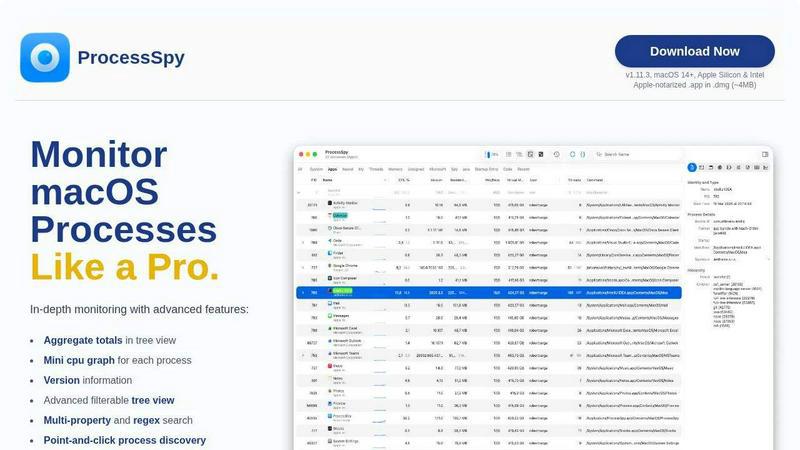
ProcessSpy visualizes all running processes in a detailed, collapsible tree view that reflects their parent-child relationships. This hierarchy is crucial for understanding which applications launched specific services or daemons. Beyond simple visualization, this view includes aggregate totals for CPU usage, memory consumption, and thread counts for any parent process and its children, providing an immediate overview of an application's total resource footprint. The tree supports the same powerful filtering and search capabilities as the main list, making it easy to isolate specific process groups.
Multi-Property and Regex Search
Moving beyond simple name matching, ProcessSpy's quick-search bar supports sophisticated queries. Users can search across multiple process properties simultaneously—such as name, PID, command line, or bundle identifier—using regular expressions for pattern matching. For example, you can instantly find all processes with "java" in the name that also contain the argument "-Xmx1024m" in their command line. This precision dramatically speeds up the process of isolating specific instances or configurations, especially in complex development environments.
JavaScript-Powered Custom Filters
For ultimate control, ProcessSpy allows users to define custom filters using JavaScript. This feature enables the creation of complex, multi-condition logic to show or hide processes based on any available property, including start time, CPU usage, or command-line arguments. This programmability makes it an invaluable tool for creating persistent views tailored to specific monitoring scenarios, such as watching for processes consuming excessive memory or flagging applications from untrusted locations.
Comprehensive Process Inspection & Context Actions
ProcessSpy provides deep inspection panels for any selected process. Users can examine open files and network connections, loaded dynamic libraries (Dylibs), and more. Each panel features a context menu with relevant actions, such as revealing a file in Finder or killing a network connection. The tool also displays version information and code signature details directly in the main table, helping to quickly distinguish between different builds or installations of similarly named software.
Use Cases
Troubleshooting and Terminating Stubborn Processes
When an application becomes unresponsive or fails to close properly, Activity Monitor may only show a generic name. ProcessSpy reveals the full executable path and command-line arguments, allowing you to positively identify the correct process to terminate. Its ability to instantly kill processes, along with any of their child processes, ensures clean resolution of hangs and prevents resource leaks that can slow down your system.
Development and Runtime Environment Analysis
Developers often run multiple instances of the same runtime (e.g., different Java JDKs, Python interpreters, or Node.js versions). ProcessSpy solves the identification problem by displaying version information and the full launch path for each process. This makes it easy to verify which specific runtime an application is using, check environment variables, and ensure the correct configuration is active, streamlining development and debugging workflows.
System Security and Software Auditing
Security-conscious users and administrators can use ProcessSpy to audit what is running on a Mac. By inspecting process entitlements, signature status, bundle identifiers, and startup origins (e.g., launch agents or daemons), you can identify unexpected or unauthorized software. The ability to see all open files and network connections for a process further aids in understanding its behavior and potential security implications.
Performance Monitoring and Resource Optimization
For performance tuning, ProcessSpy offers detailed, real-time metrics. The mini CPU graph per process provides an at-a-glance view of activity trends. With the paid features, historical tracking of CPU and memory usage can be recorded and later exported to CSV for analysis. This data is essential for identifying memory leaks, pinpointing resource-intensive background processes, and optimizing an application's overall system footprint.
Pricing
ProcessSpy operates on a freemium model. The core application is free to download and use with a robust set of features. Advanced professional features are unlocked with a one-time license purchase. The lifetime license is available for $24.99 (USD) via Gumroad. This single payment grants the user a perpetual license for unlimited personal devices and includes all future updates and new features at no extra charge. There are no subscription fees, tiered plans, or recurring costs.
Frequently Asked Questions
Is ProcessSpy safe to install on my Mac?
Yes, ProcessSpy is completely safe. The application is Apple-notarized, meaning it has been scanned and approved by Apple for malicious content. It is distributed as a signed .app file inside a .dmg disk image, ensuring its integrity. It runs natively on both Intel and Apple Silicon Macs without requiring lower-level system permissions that could compromise security.
What versions of macOS are supported?
ProcessSpy is designed for modern macOS systems. It officially supports macOS 14 (Sonoma) and newer versions, including the latest releases. The developer specifically notes support for future versions like macOS 26 (Tahoe), indicating a commitment to compatibility with the Apple ecosystem. It is not intended for older, legacy versions of macOS.
What is the difference between the free and paid features?
The free version of ProcessSpy includes core functionality like the advanced process tree, multi-property search, JavaScript filters, basic process information, and point-and-click discovery. Paid features, unlocked via a license, include viewing environment variables, process entitlements, Info.plist contents, startup entry points, historical process recording (CPU/Memory/Threads), CSV export, and the ability to remember finished processes with their full details for later review.
What is the licensing model for the paid version?
A single license for ProcessSpy costs $24.99 and is purchased through Gumroad. This license is per user, not per machine, meaning one purchaser can use it on an unlimited number of their own devices. The license includes lifetime updates, so all future feature enhancements and compatibility improvements are provided at no additional cost.
Similar to ProcessSpy

Egmatic
Egmatic is a no-code editor for 2D games that takes a project from first scene to published build, with no backend work.

WidgIq
Provide an AI-powered customer support widget for your website

stackledge
A human-verified discovery hub for founders. Find dependable SaaS tools, practical AI apps, and custom n8n workflows without enterprise bloat.


Product Launch Checklist
A free launch checklist for SaaS, apps, AI tools and more. Every step says why it matters and when you can skip it.

Forms Plugin
The #1 Native Form Builder Plugin for Framer - No Code, No Embeds, No External Platforms.

Chatit Me - Free Random Chat Alternative
Chat with random strangers online for free on ChatIt.me. Enjoy safe, anonymous, and instant 1-on-1 conversations with people worldwide
